
Optimizing a service page for Google is a focused exercise in clarity, relevance, and user experience. Done well, on-page SEO helps your service pages rank higher, convert more visitors, and support local visibility for service-based businesses. This guide walks you through a step-by-step process to optimize a service page — covering meta title and description, headings, keyword placement, FAQs, internal links, images, schema, testimonials, service areas, and CTAs.
Why on-page SEO matters for service pages
Service pages target potential customers with clear intent: they want a specific service, often locally. Proper on-page SEO signals to Google and users that your page directly answers that intent. It also improves click-through rates, reduces bounce rates, and increases conversions.
Step 1 – Craft a strong meta title and meta description
Meta elements are the first touchpoint in search results. Make them clear, benefit-driven, and include your primary keyword naturally.
- Meta title: Keep it under ~60 characters. Put the primary keyword near the front. Example: “On-Page SEO for Service Pages | [Service] in [Location]”.
- Meta description: Keep it under ~155 characters. Summarize the page benefit and include a call-to-action. Example: “Learn how to optimize service pages with titles, headings, FAQs, internal links, images, schema, and CTAs.”
Step 2 – Use a clear H1 and supporting H2s
Your H1 should match the page’s main topic and contain the primary keyword where it reads naturally. Avoid using multiple H1s.
- H1 example: “Professional Plumbing Services in [City] — Fast, Reliable Repairs”
- Use H2s to break the content into logical sections (features, benefits, process, pricing, FAQs). H2s are excellent places to include secondary keywords like “service page SEO” and “SEO content”.
Step 3 – Smart keyword placement and content structure
Effective on-page SEO is more about helpful structure than keyword stuffing. Place your focus keyword and related terms in strategic locations:
- Within the first 100–150 words of the main content.
- In at least one H2 or H3.
- In the meta title and meta description.
- Occasionally in body text, naturally, maintaining readability.
Write content that answers common user questions and reflects search intent — explain the service, the process, pricing ranges or packages, and what makes your offer different. Aim for clarity and scannability with short paragraphs and bullet lists.
Step 4 – Add a helpful FAQ section
FAQs improve user experience, help you rank for long-tail queries, and are ideal candidates for FAQ schema (more on schema below). Use real customer questions:
- What does the service include?
- How long does the service take?
- Do you offer guarantees or warranties?
- What areas do you serve?
Write concise answers (1–3 short sentences) and include variations of your keyword like “service page SEO” or “service page” where natural.
Step 5 – Internal links: connect related content
Internal links pass authority and help users discover relevant pages. For service page SEO, link to:
- Related service pages (e.g., sub-services or packages)
- Case studies or portfolio examples
- Blog posts that explain the process or benefits
- Contact or booking pages
Use descriptive anchor text (avoid “click here”). For example: “Read our service area optimization case study” or “View pricing and packages.”
Step 6 – Optimize images and alt text
Images improve engagement and help support relevance signals. Optimize images by:
- Compressing file size for fast load times.
- Using descriptive file names (e.g., plumbing-repair-technician.jpg).
- Adding accurate alt text that describes the image and, where appropriate, includes the primary keyword naturally: “Technician performing plumbing repair in [City]”.
Avoid stuffing keywords into alt attributes — describe the image primarily for accessibility.
Step 7 – Implement structured data (schema)
Schema helps search engines understand your content and can enable rich results. For service pages, consider these schema types:
- Service — describes the service you offer (name, description, provider).
- LocalBusiness — for location, address, and contact details.
- FAQPage — for your FAQ section.
- Review — to display ratings and testimonials in search.
Example (conceptual) JSON-LD structure you can provide to your developer or add to the page head as JSON-LD (replace bracketed items):
{ “@context”: “https://schema.org”, “@type”: “Service”, “name”: “[Service Name]”, “description”: “Short description of the service”, “provider”: { “@type”: “LocalBusiness”, “name”: “[Business Name]”, “address”: “[Full Address]” } }
Work with your developer to implement the JSON-LD correctly and validate with Google’s Rich Results Test.
Step 8 – Use testimonials and social proof
Testimonials build trust and can be marked up with review schema. Display short, specific quotes that highlight outcomes. Consider adding a rotating testimonials block and an option to view full case studies. Keep testimonials authentic — include first names and general location (e.g., “— Sarah, Small Business Owner, Austin”).
Step 9 – Include service areas for local relevance
Explicitly listing service areas helps local SEO and reduces confusion for visitors. Include a short paragraph describing where you operate and a list of neighborhoods, cities, or regions. If you serve multiple areas, create dedicated service area pages and link to them from the main service page.
Step 10 – Strong CTAs and conversion elements
Each service page should guide the visitor toward a clear next step. Use multiple CTAs across the page, varying by intent:
- Primary CTA: “Get a Free Quote” or “Book Now” — prominent and visible above the fold.
- Secondary CTA: “View Pricing” or “Read Case Study” — for visitors who need more info.
- Low-friction CTA: “Call Us” or “Send a Message” — useful for mobile users.
Use contrasting buttons visually (your designer will handle styling) and ensure each CTA leads to a fast, simple form or a direct phone action.
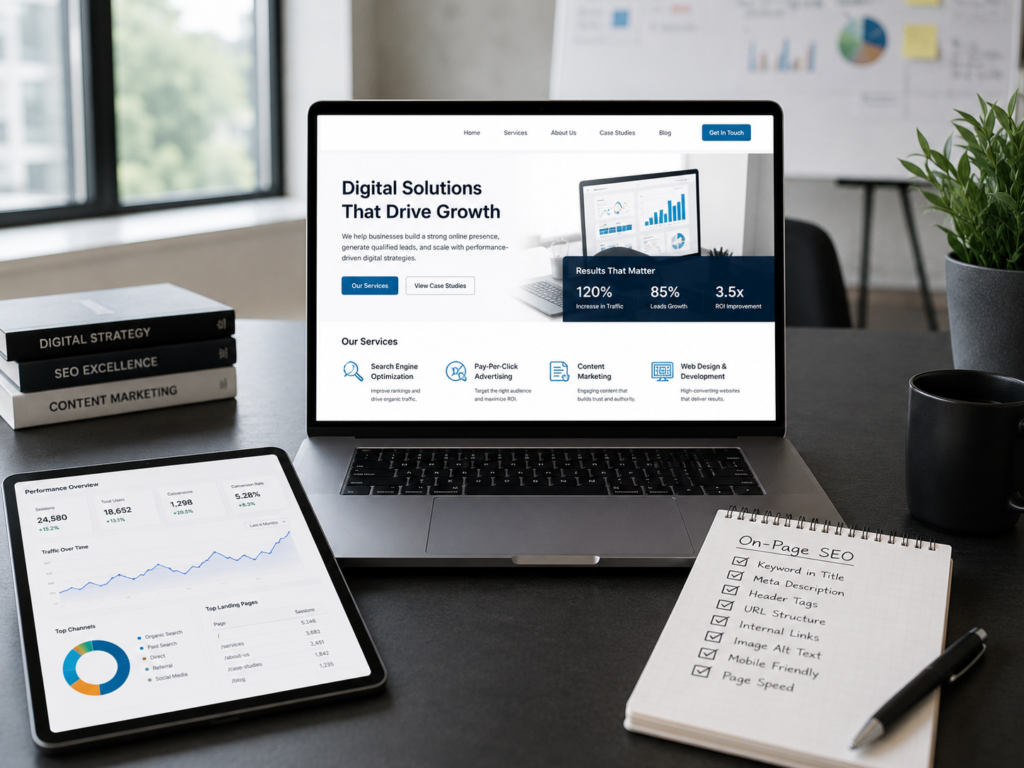
On-page SEO checklist before publishing
- Meta title includes primary keyword and fits length limits.
- Meta description clearly states benefits and CTA.
- H1 is descriptive and contains the focus keyword.
- H2s structure the content and include related keywords.
- The primary keyword appears early and naturally in the text.
- Images optimized for size with descriptive alt text.
- Internal links to related pages, case studies, and the contact page.
- FAQ section added and marked for FAQ schema.
- Schema implemented for Service, LocalBusiness, and Reviews where relevant.
- Testimonials and social proof present.
- Service areas listed and linked to detail pages where appropriate.
- Clear CTAs present and mobile-friendly.
Practical examples and tips
If you offer HVAC repair in Denver, an example headline and meta might be:
- Meta title: “HVAC Repair Denver — Fast Local Technicians | On-Page SEO for Service Pages”
- H1: “Trusted HVAC Repair in Denver — Same-Day Service Available”
- First paragraph: “Looking for fast HVAC repair in Denver? Our certified technicians respond quickly and fix common heating and cooling problems. Book online or call us for a free estimate.”
Keep testing variations of headlines and CTAs using simple A/B approaches or by tracking clicks in Google Analytics or your CRM.
How AM Digitalz can help
At AM Digitalz, we optimize service pages for real business results — from keyword research and content structure to schema implementation and conversion optimization. If you need help auditing existing pages or building high-converting service pages, our team can create an on-page SEO plan tailored to your industry and service areas.
Conclusion
Optimizing service pages with disciplined on-page SEO practices improves visibility and conversions. Focus on a clear meta title and description, a strong H1 and H2 structure, intentional keyword placement, helpful FAQs, internal links, optimized images, schema markup, testimonials, and conversion-focused CTAs. Use the checklist above to audit each page before publishing and iterate based on performance data.
Ready to improve your service page SEO and convert more visitors? Contact AM Digitalz for a tailored audit and a step-by-step implementation plan.